Self-operating
thermal inspection.
Every day, on the same route.
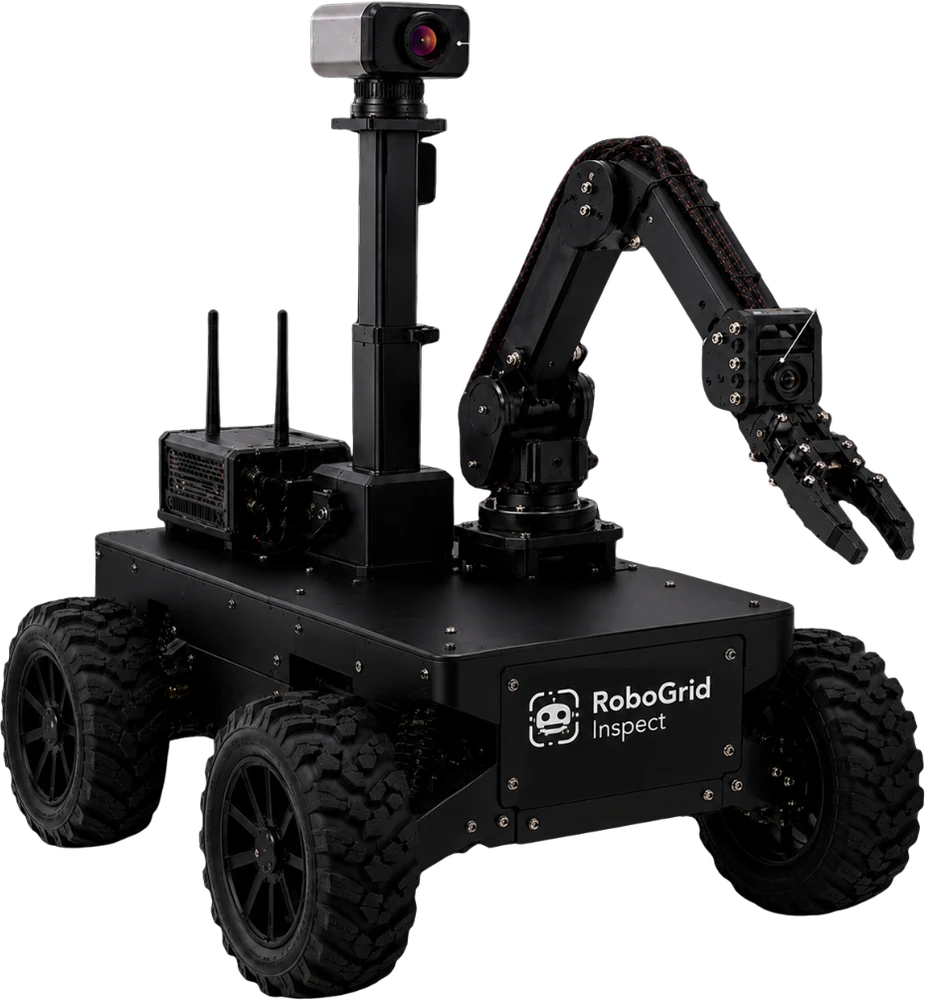
RoboGrid Inspect is an autonomous inspection robot designed for panel rooms, indoor substations, and battery rooms. It navigates pre-mapped routes, reads each panel using thermal and RGB cameras, and streams real-time asset condition evidence straight to the dashboard.
Built by
BRAIN — Ayam Jago
Indonesian AIoT & robotics
Targeted Operating Environments
≥95%
Mission success rate
in test environment
≤30 cm
Waypoint positioning error
stop accuracy
≥85%
Detection precision / recall
defined scenarios
<1 s
Alarm latency
on local network
≥30%
Patrol time reduction
compared to manual
Prototype targets and pilot OKRs follow the Definition of Done in the product specification.
Problems
Manual patrols are costly, repetitive, and difficult to verify.
Repetitive manual patrols
Personnel walk the same routes in panel rooms and energized areas to read indicators and check for thermal hotspots.
Blind intervals between inspections
Anomalies that emerge right after an inspection are only caught on the next round — or after a failure occurs.
Inconsistent comparison data
Photos, thermal images, and technician notes are captured from inconsistent angles and times, making trends hard to trace.
Personnel constraints
High-value engineering staff spend hours on routine patrols that could be largely automated.
Consistent thermal evidence
Every panel is captured from the exact same pose on every visit, allowing temperature rise to be compared over time rather than guessed.
Reduced personnel exposure
The robot conducts initial sweeps in panel rooms and utility spaces, lowering engineer entry frequency in hazardous areas.
Edge-based analytics
Emissivity correction, hotspot detection, and anomaly scoring execute directly on-device for real-time alerting even on constrained networks.
How It Works
Six steps, from mapping to reporting.
Area mapping
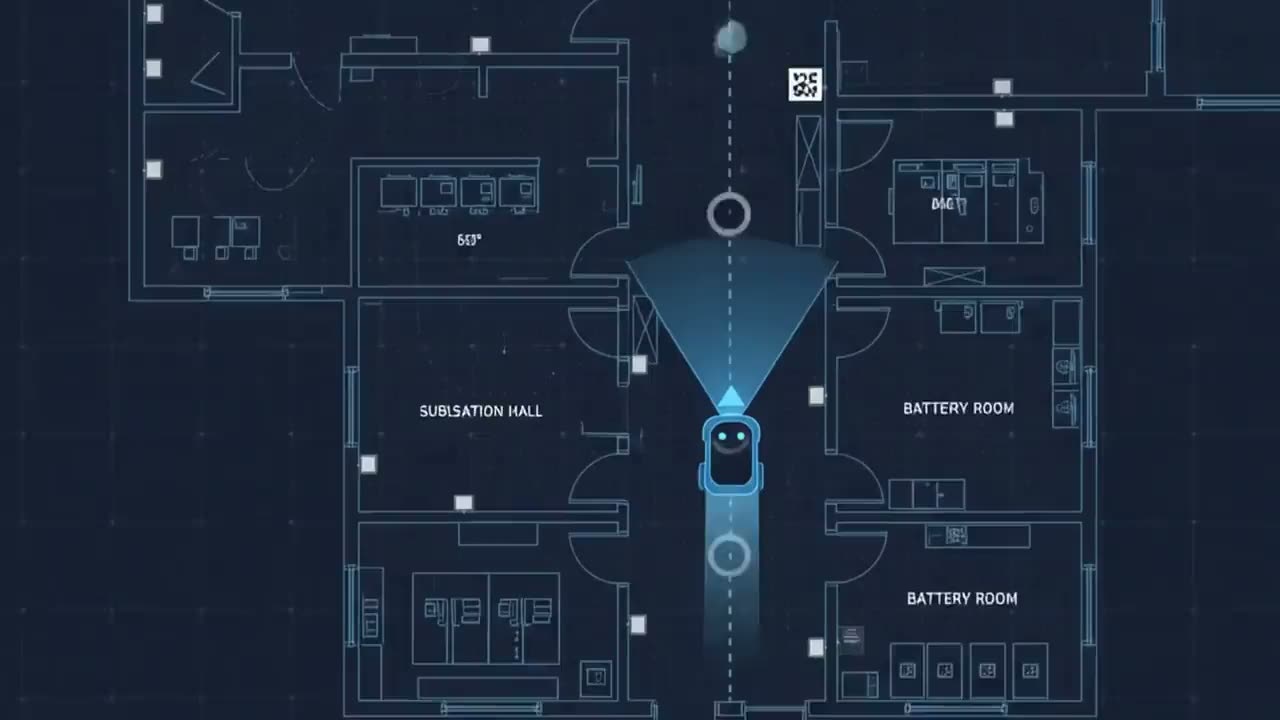
Routes and asset waypoints are recorded once, then reused for every mission.
Scheduled missions
The robot performs automated patrols with obstacle avoidance and emergency stop features.
Panel validation
The gripper camera reads ArUco markers to confirm the correct panel before inspecting.
Data acquisition
The mast thermal camera and RGB camera record asset conditions from consistent poses every visit.
Edge processing
Emissivity correction, hotspot detection, and anomaly scoring run directly on the device.
Evidence & action
Findings appear on the dashboard with thermal proof, trend graphs, and exportable reports.
What the Robot Sees
Three perspectives, one mission.
RGB Camera — gripper
Reads ArUco markers, opens panel covers, and captures close-up inspection footage.
Thermal Camera — mast
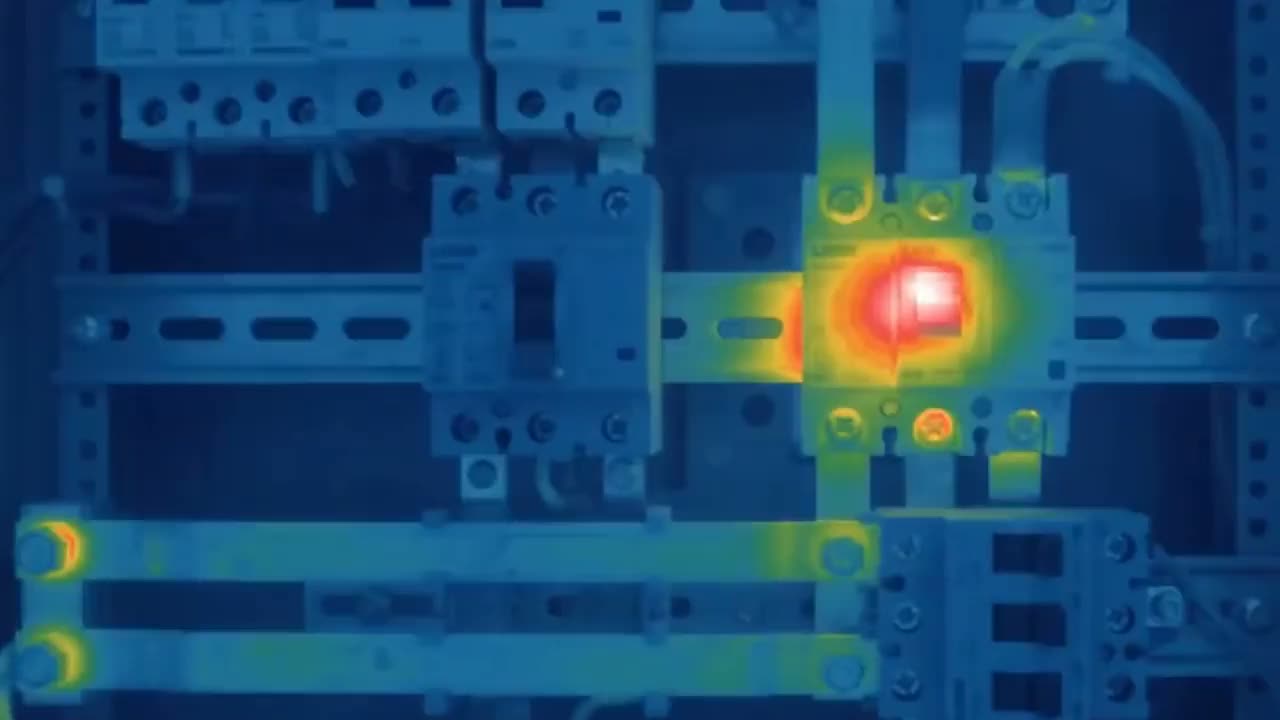
Scans the entire panel surface and flags hotspots elevated above baseline.
Facility Navigation
Traverses pre-mapped routes, stopping precisely at every asset waypoint.
Hardware
Built from accessible components.
Designed under a prototype budget of Rp7 million (~$450), utilizing a 4WD chassis, an edge computer, and a low-cost thermal array — not an industrial-grade robotics platform.
- Thermal camera
- MLX90640, mounted atop the mast
- RGB camera
- Mounted on the arm gripper
- Navigation
- ArUco markers + 9-axis IMU + wheel odometry
- Obstacle detection
- Short-range infrared sensors
- Drive system
- 4WD chassis with motor encoders
- Communication
- Wi-Fi, MQTT, REST API
Dashboard
Actionable inspection evidence.
Missions
3/8
Panels
24/120
Avg
48.6°
Mission Overview
 72.4 °C
Max
72.4°
Avg
46.2°
Base
42.0°
Thermal Inspection
Navigation & Missions
Mission dashboard
Mission overview, live progress, and key KPIs consolidated on a single screen.
Thermal heatmap
Thermal mapping and hotspot detection per panel, complete with temperature scale.
Temperature trends
Asset thermal history so gradual temperature rises are identified before causing downtime.
Multi-level alarms
Warning and critical alerts with operator acknowledgment workflows.
Automated reports
Thermal inspection reports ready for PDF and Excel export for documentation.
AI Assistant
Query asset health, risky panels, and action recommendations directly on the dashboard.
Frequently Asked Questions
No. RoboGrid automates routine patrols and condition documentation. Findings are always verified by technicians, and those verification results serve as training data for future iterations.
No. RoboGrid is not a replacement for protection relays, SCADA, or fire/gas systems, nor does it diagnose internal faults from a single sensor alone.
Designed for indoor or semi-indoor environments with repeatable mappable routes: panel rooms, indoor substations, battery rooms, and industrial facilities.
Prototypes are tested on mockups or safe areas without exposed high voltage. Operation in energized environments requires HSE assessments, EMC compliance, and site access clearance.
Robot-as-a-Service with installation and subscription per site, direct hardware sales, SaaS analytics for history and reporting, and integration services for CMMS and asset management systems.
Not yet. This demo dashboard operates on simulated data to demonstrate the end-to-end workflow before physical hardware is installed on site.
See the workflow in action.
The demo dashboard runs on simulated live data — missions, thermal findings, alarms, and exportable reports, exactly as displayed when deployed on site.
Open Demo Dashboard